
The final size of your print depends on the aspect ratio of the file you submit. We always print your photo as large as possible while maintaining its original proportions within the selected format. For example, if you order a photo in the 20×20–20×30 size range, the final result may vary depending on the aspect ratio of your image, resulting in different final sizes:
We print photos according to their original aspect ratio. This means that you can’t simply turn a photo file with a 2:3 ratio into a square photo with a 1:1 ratio without cropping. The photo needs to be cropped for this. You can do this afterwards, but it’s easier to submit the photo in the correct aspect ratio from the start. For this, you can use the (free) tools listed below.
| 1:1 | 2:3 | 3:4 | 9:16 | |
|---|---|---|---|---|
| size | 20x20cm | 20x30cm | 20x27cm | 17x30cm |
So if you are looking for a specific size, you need to take the photo’s aspect ratio into account. You can also crop the photo yourself after receiving it, but it is easier to supply the photo in the correct aspect ratio from the start so you can be sure everything turns out right. This can be done with programs such as Photoshop or Lightroom, but also with the free websites below, which you can use to crop your photo and then upload it to us in the correct aspect ratio.
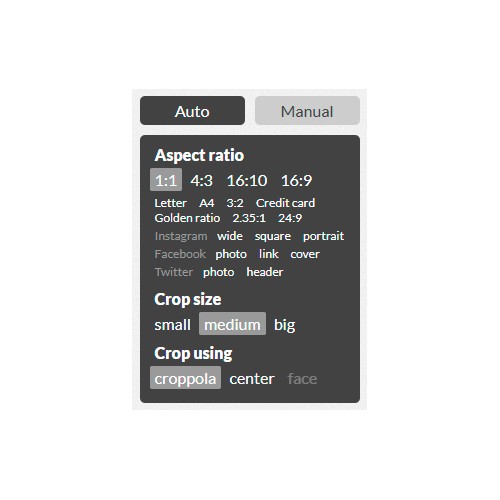
Croppola
- Go to https://croppola.com/
- Open the desired photo by clicking on the area or by dragging the image into the window.
- Crop the photo to the desired size by selecting the correct aspect ratio in the menu on the right. Under Auto, you can choose from the available options; under Manual, you can enter the aspect ratio yourself.
- You can save the cropped photo by clicking the Download this crop button.
Pixlr
- Go to https://pixlr.com/editor/
- Open the desired photo.
- Crop the photo to the desired size. To do this, go to Image → Crop. The constraint is set to No restriction by default. Change this to Aspect ratio and enter the ratio you want.
Example: if you want a square print, enter 1 and 1 for height and width. Apply the settings and crop the photo. - Go to File → Save and save the cropped photo. You can now order this file from us.

There are many different software options available for cropping images to a specific aspect ratio.